Booting Windows from a mechanical hard drive in 2026 is like typing on a keyboard from the 1990s — perfectly functional, but everyone around you has already moved on. A ₹10,000 budget today buys real choice: a 1TB or even 2TB SATA drive with room to spare, or a genuinely fast NVMe M.2 drive if your laptop or motherboard supports it. Here are ten SSDs worth considering for Indian buyers as of September 2026, covering both SATA and NVMe options across different capacities.
| SSD | Approx. Price | Type | Capacity | Best For |
| Crucial BX500 | ₹4,000–₹8,500 | SATA III 2.5″ | 1TB / 2TB | Safest, most proven upgrade for older laptops/desktops |
| Samsung 980 | ₹6,000–₹8,500 | NVMe M.2 (PCIe 3.0) | 1TB | Reliable, well-reviewed NVMe on a budget |
| WD Blue SN580 | ₹6,000–₹8,000 | NVMe M.2 (PCIe 4.0) | 1TB | Faster Gen4 speeds at a Gen3-adjacent price |
| WD Black SN770 | ₹7,500–₹9,500 | NVMe M.2 (PCIe 4.0) | 1TB | Gaming and heavier workloads |
| Samsung 970 EVO Plus | ₹6,500–₹9,000 | NVMe M.2 (PCIe 3.0) | 500GB | Trusted Samsung reliability at lower capacity |
| Crucial P3 / P3 Plus | ₹5,000–₹8,500 | NVMe M.2 (PCIe 3.0/4.0) | 1TB | Budget NVMe with strong endurance rating |
| WD Green | ₹4,500–₹6,500 | SATA III 2.5″ | 1TB | Cheapest reliable SATA upgrade |
| Kingston NV2 | ₹5,000–₹7,500 | NVMe M.2 (PCIe 4.0) | 1TB | DRAM-less budget NVMe for light use |
| SanDisk Extreme Portable SSD | ₹8,000–₹9,500 | External USB SSD | 1TB | Portable, cross-device storage |
| Crucial X6 Portable SSD | ₹6,000–₹8,500 | External USB SSD | 1TB | Budget portable option, shock-resistant |
Prices are indicative as of September 2026 and vary by retailer and sale periods — check live pricing before buying, since SSD prices fluctuate more than most PC components.
The Ten SSDs in Detail
1. Crucial BX500
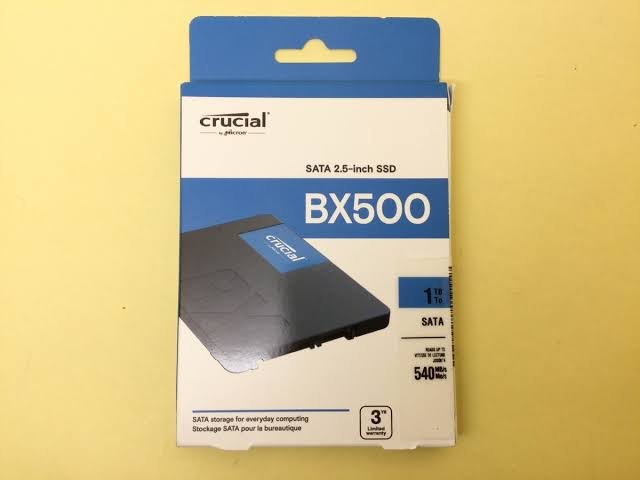
The safest, most proven choice for most Indian buyers upgrading an existing laptop or desktop, fitting nearly any machine with a 2.5-inch bay. It includes cloning software to migrate your existing Windows install, and carries one of the largest review bases of any SSD sold in India, giving genuine confidence in long-term reliability.
2. Samsung 980
A well-reviewed, dependable NVMe M.2 drive that brings a real speed jump over SATA for anyone with a free M.2 slot. Samsung’s Magician software adds useful monitoring and health-check features, and the brand’s track record for reliability carries real weight here.
3. WD Blue SN580
Brings PCIe 4.0 speeds at a price that competes directly with older PCIe 3.0 drives, making it a smart pick if your motherboard supports the newer standard and you want some future headroom without paying flagship prices.
4. WD Black SN770
Aimed at gamers and heavier workloads, offering stronger sustained performance than budget-tier NVMe drives. A solid choice for anyone loading large game libraries or working with bigger media files regularly.
5. Samsung 970 EVO Plus
An older but still thoroughly dependable NVMe drive, particularly good value at the 500GB capacity for buyers who mainly need a fast boot drive with a separate storage drive for bulk files.
6. Crucial P3 / P3 Plus
A genuinely strong budget NVMe option with an endurance rating (around 220TB written on the 1TB model) that comfortably exceeds what a typical user will reach over the drive’s lifetime, giving real peace of mind for the price.
7. WD Green
The value alternative to the Crucial BX500 whenever it’s cheaper on a given day, offering the same core SATA SSD benefits — quiet operation, no moving parts, faster boot times — at an even more accessible price.
8. Kingston NV2
A DRAM-less NVMe drive, meaning it skips onboard DRAM caching to keep costs down. Perfectly serviceable for everyday use, light gaming and general productivity, though it trails DRAM-equipped drives under sustained heavy write loads.
9. SanDisk Extreme Portable SSD
The pick for anyone who wants to carry fast storage between machines, whether for video editing on the go or simply backing up files across a laptop and desktop. Rugged, compact and genuinely fast over USB.
10. Crucial X6 Portable SSD
A more budget-friendly portable option than the SanDisk Extreme, still offering solid transfer speeds and shock resistance, making it a sensible choice for straightforward backup and file-transfer needs.
What to Actually Check Before Buying
- Confirm your laptop or motherboard actually supports NVMe M.2 before buying one — older systems, and some budget laptops, only have a SATA interface, in which case an NVMe drive either won’t fit or won’t run at its rated speed.
- SATA SSDs are still a massive upgrade over a mechanical hard drive, even though they’re slower than NVMe, so don’t feel pressured into NVMe if your system doesn’t support it or the price difference doesn’t make sense for your use case.
- Check the TBW (Terabytes Written) endurance rating, especially on DRAM-less or budget drives, since this tells you how much data the drive can handle over its lifetime before wear becomes a concern.
- 1TB has become the practical minimum capacity for most users in 2026, given how much space modern operating systems, games and applications now consume — a 500GB drive fills up faster than most people expect.
- For gaming specifically, NVMe speed matters less than people assume for load times, since most of the benefit shows up in file transfers and application launches rather than in-game performance once a game is loaded.
Frequently Asked Questions
Q1. Is it worth paying extra for an NVMe SSD over a SATA SSD if I’m just using my PC for browsing and office work?
Not particularly — for everyday browsing, documents and office work, a SATA SSD like the Crucial BX500 already eliminates the biggest bottleneck (the old mechanical hard drive), and the extra speed of NVMe is far more noticeable in tasks like video editing, large file transfers or loading big games.
Q2. Can I use an SSD as pure additional storage alongside my existing hard drive, or does it need to be my main drive?
You can absolutely use it either way — many users install their operating system and frequently used applications on the SSD for speed, while keeping a larger, cheaper hard drive for bulk storage like photos, videos and less frequently accessed files.
Q3. How do I know if my laptop has a free M.2 slot for an NVMe SSD, or if I should just get a SATA drive?
Check your laptop’s specific model documentation or use a free tool like CrystalDiskInfo to see your current drive’s interface type, since many budget and older laptops only support SATA even if they have an M.2-shaped slot, which would make an NVMe drive run at SATA speeds or not be recognized at all.
Q4. Are portable external SSDs like the SanDisk Extreme worth it compared to buying an internal drive and an enclosure separately?
For most buyers, a purpose-built portable SSD is the simpler and safer choice, since it comes pre-tested for shock resistance and thermal management in that specific form factor, whereas building your own with a separate internal drive and enclosure can work out cheaper but requires more research to avoid compatibility or overheating issues.