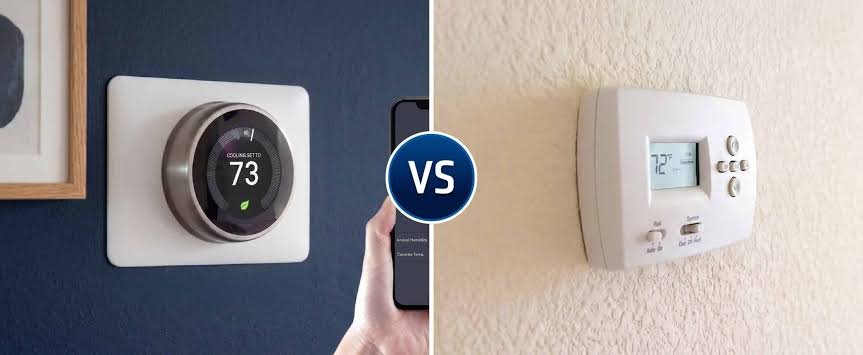
Few Indian homes have a thermostat mounted on the wall, yet almost every household relies on one every day. The temperature setting on your AC remote, the dial on an oil-filled room heater and the knob inside your geyser all depend on thermostat control. Choosing between a smart thermostat and a regular thermostat decides how intelligently that control works: whether your AC simply holds a temperature you set, or adjusts itself around your routine, your location and even the humidity in the room. For Indian homes, where cooling makes up a large share of the summer electricity bill, that difference can be worth real money.
Where Thermostats Show Up in Indian Homes
In India, the thermostat question usually appears in four places:
- Split and window ACs, where the thermostat is built into the unit and set through the remote
- Ducted and VRF air-conditioning in villas, penthouses and premium apartments, controlled through wall-mounted controllers
- Room heaters and underfloor heating in hill stations and North Indian winters
- Geysers, which have an internal thermostat that cuts power once water reaches the set temperature
For split ACs, the “smart thermostat” option usually means either a Wi-Fi-enabled AC with its own app or a smart AC controller that sends signals to the AC like a remote. For ducted and VRF systems, it means a smart wall thermostat compatible with that system.
What a Regular Thermostat Does Well
A regular thermostat keeps things simple. You set a temperature, and it switches cooling or heating on and off to hold it. Mechanical versions use a dial, while digital ones show the exact temperature and may offer basic programmable timers.
Their strengths are clear:
- They work without Wi-Fi or an app.
- Anyone in the family can use them immediately.
- They’re inexpensive and rarely fail.
- Settings stay consistent until someone changes them.
For a guest room AC used occasionally, or a heater in a small room, a regular thermostat does the job perfectly well.
What a Smart Thermostat Adds
Schedules That Follow Your Routine
Smart thermostats can run different temperatures for different times of day. For example, cooling the bedroom to 25°C an hour before bedtime, easing to 26°C after midnight when the room cools naturally, and switching off at 6 am. Some models learn these patterns automatically over a few weeks.
Geofencing
Using your phone’s location, a smart thermostat can switch the AC off when the last family member leaves home and start cooling again as someone heads back. It removes the common problem of an AC running in an empty room all afternoon.
Humidity Awareness
In coastal cities like Mumbai, Chennai and Kolkata, humidity often feels worse than heat. Many smart controllers track humidity and can switch the AC to dry mode, removing moisture while using less power than full cooling.
Remote Checks for Family
During heat waves, families can check from their phones that the AC in an elderly parent’s room is on and set to a safe temperature, even from another city. Energy reports also show which rooms use the most electricity.
The 24°C Saving, Worked Out
The Bureau of Energy Efficiency recommends 24°C as the default AC setting and notes that each 1°C increase in the set temperature saves about 6 percent of electricity.
Consider a 1.5-ton inverter AC drawing an average of about 1 kW and running 8 hours a day. That’s around 240 units a month, or roughly ₹1,680 at ₹7 per unit.
If the family typically sets it to 22°C, moving to 24°C saves about 12 percent, or around ₹200 a month. For a home with three ACs over six warm months, that’s roughly ₹3,600 a year.
A smart thermostat or AC controller makes this easy by holding the right setting, applying schedules and switching off empty rooms. Smart AC controllers in India typically cost a few thousand rupees each, so the savings can cover the cost within one or two summers. Add geofencing and night schedules, and the savings often grow further.
Compatibility Checks Before Buying
Smart thermostats need a little homework first.
- Split ACs: Check whether your AC model already supports Wi-Fi through the manufacturer’s app. If not, confirm the smart controller supports your AC brand’s remote codes.
- Ducted and VRF systems: Ask the AC installer or brand whether third-party smart thermostats are supported, since many systems use proprietary controllers.
- Wi-Fi coverage: Make sure every room with a controller gets a stable signal.
- Power cuts: Check whether the device restores settings automatically after power returns.
- Placement: Keep wall thermostats away from direct sunlight, kitchens and the AC’s air outlet, all of which give false readings.
- Heaters: Use only controls rated for the heater’s power, since room heaters draw heavy current.
Which Option Fits Your Home
A regular thermostat suits you if:
- Your ACs are used only occasionally
- Family members prefer simple remotes and dials
- Your home has unreliable Wi-Fi
- You’re in a rented home with a basic AC setup
A smart thermostat or controller suits you if:
- ACs run for long hours from March to October
- Rooms often stay cooled while empty
- You live in a humid coastal city
- Elderly parents live alone and you want remote checks
- You have a ducted or VRF system that supports smart control
Many homes start with smart control in the master bedroom and living room, where ACs run longest, and keep regular controls elsewhere.
Small Habits That Help Either Way
- Keep the AC at 24°C to 26°C with the ceiling fan on low.
- Clean AC filters every two to three weeks in peak summer.
- Close curtains on west-facing windows in the afternoon.
- Set geyser thermostats around 50°C to 55°C rather than the maximum.
- Turn off heaters once the room is warm, using the built-in thermostat setting.
FAQs
Q1. Is a smart thermostat useful in India?
A: Yes, especially for homes where ACs run many hours a day, since schedules and remote control reduce wasted cooling.
Q2. Can I use a smart thermostat with a split AC?
A: Split ACs usually use smart AC controllers or built-in Wi-Fi features rather than wall thermostats.
Q3. How much can a smart thermostat save?
A: Raising the AC from 22°C to 24°C alone can save around 12 percent of cooling electricity.
Q4. Do smart thermostats work during internet outages?
A: Most continue working with their last settings, though remote control and schedules may pause until the connection returns.
Q5. What temperature is best for AC in India?
A: The Bureau of Energy Efficiency recommends 24°C as the default setting for comfort and energy savings.
Q6. Are regular thermostats still a good choice?
A: Yes, they’re reliable and simple, and they suit rooms where the AC or heater is used occasionally.